

[Q&A] File Types Supported & How We Handle Unsupported Files
Supported file types and sizes, what happens with unsupported files, and how Canvas settings prevent them.

What happens when a student uploads a file TimelyGrader can’t process?
Supported file types
Students can submit several files, so a range of types is possible. TimelyGrader currently supports .pdf, .docx, .doc, .xls, .xlsx, .csv, .ppt, .pptx, .mp4 and .mov.
Supported file sizes
A supported file type can still be too large:
Written documents (PDF, Word, Excel): each file under 30 MB.
Video files: each file under 300 MB.
Each student’s total submission: no more than 500 MB.
When a student uploads an unsupported file
Unsupported files, such as a .pages file or a 50 MB PDF, still appear in TimelyGrader so you can see them, and TimelyGrader flags whether the problem is the file type or its size.
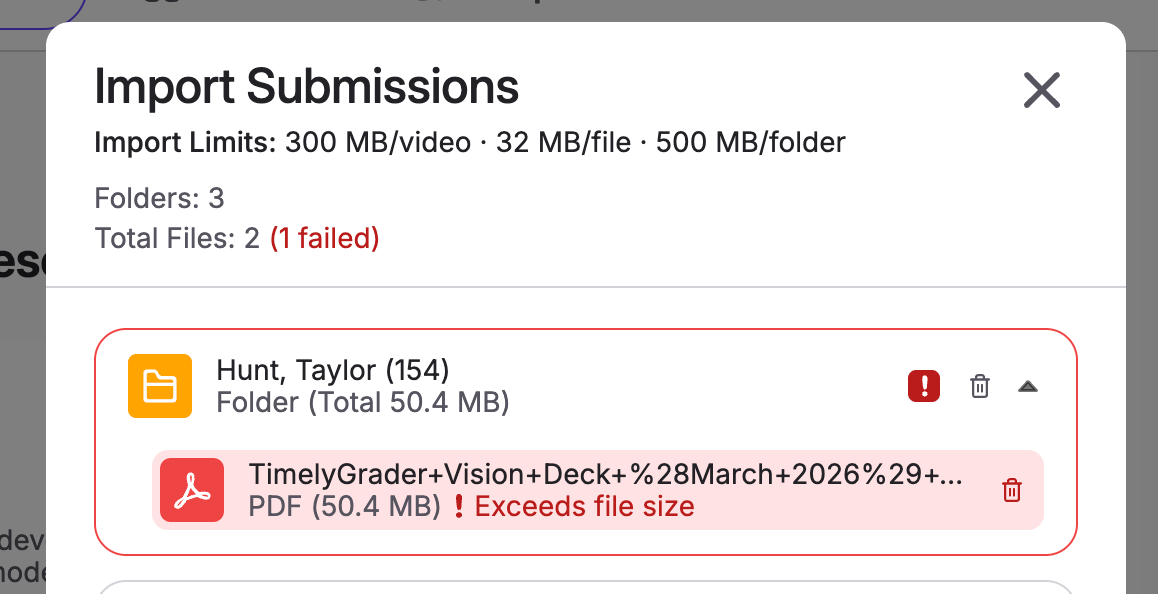
Ask the student to resubmit with a supported file type and size, then import again.
Prevent it with your Canvas assignment settings
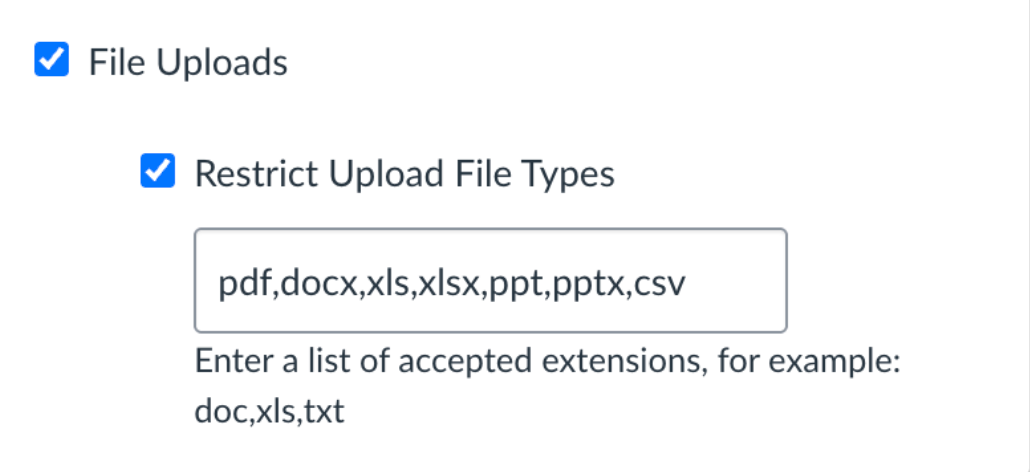
On your Canvas assignments, select File Uploads and Restrict Upload File Types so students can only upload files TimelyGrader can process. You can paste this list of extensions:
Related articles
Last updated
Was this helpful?