> For the complete documentation index, see [llms.txt](https://help.timelygrader.ai/llms.txt). Markdown versions of documentation pages are available by appending `.md` to page URLs; this page is available as [Markdown](https://help.timelygrader.ai/canvas-support-articles/rubrics-page-managing-and-creating-rubrics-canvas/4.-rubric-passback-to-canvas-assignments.md).
# 4. Rubric Passback to Canvas Assignments
Sync your TimelyGrader rubric to the Canvas assignment so criterion grades and per-criterion feedback go back to Canvas.
Canvas supports rubric passback: TimelyGrader can send the rubric you use in TimelyGrader to the linked Canvas assignment or quiz. Once the rubric is in Canvas, each student’s criterion grades and per-criterion feedback can go back with their grade.
{% hint style="info" %}
Rubric passback only applies to assignments and quizzes imported from Canvas. An assignment created from scratch in TimelyGrader isn’t linked to Canvas, so nothing is sent back.
{% endhint %}
## Syncing the rubric to Canvas
{% stepper %}
{% step %}
### Save or publish the assignment
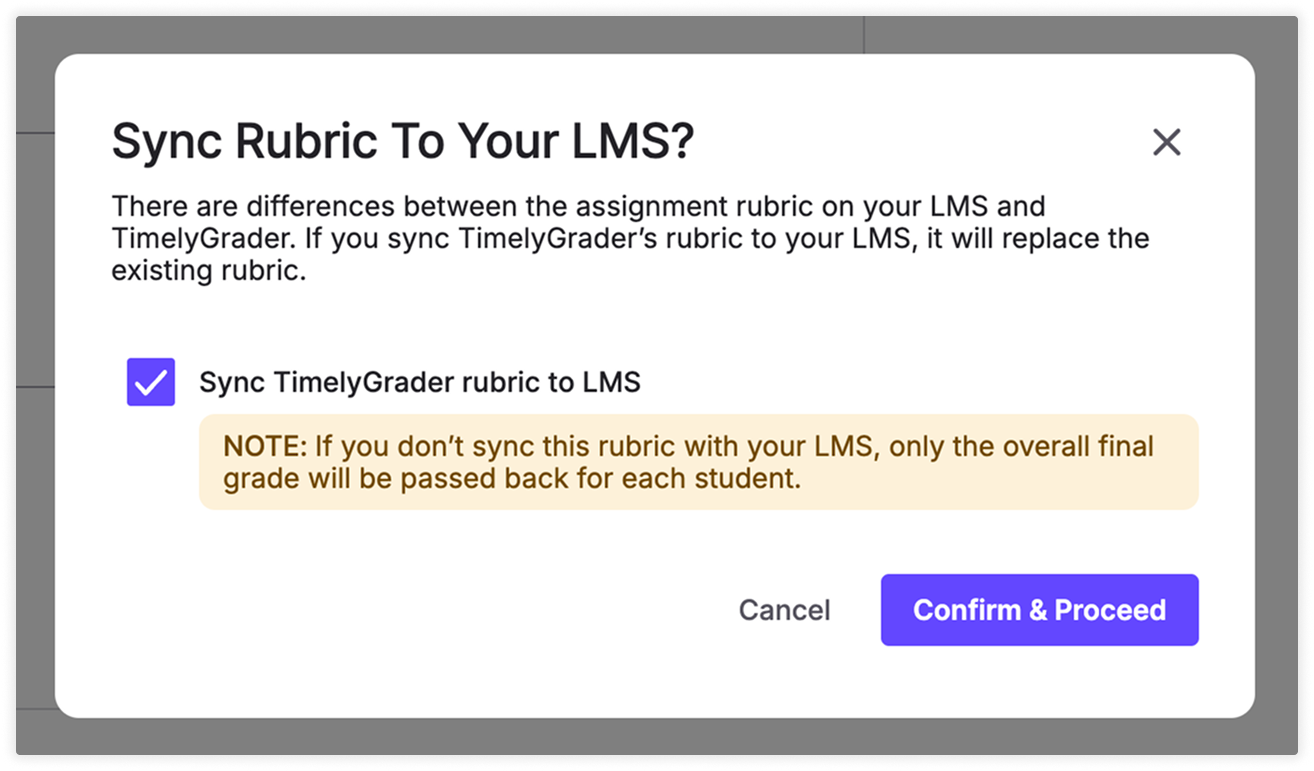
When you save or publish an imported assignment, the Rubric Passback pop-up asks whether to sync the rubric back to Canvas.
{% endstep %}
{% step %}
### Decide whether to sync
Tick **Sync TimelyGrader rubric to LMS** to send the rubric to Canvas. It replaces the assignment’s existing rubric in Canvas, or is added if there isn’t one. Leave it unticked to keep Canvas as it is.
{% endstep %}
{% step %}
### Confirm
Confirm in the pop-up. If you synced, the same criteria now appear in Canvas, so students and TAs see the rubric you grade with.
{% endstep %}
{% endstepper %}
## Quizzes
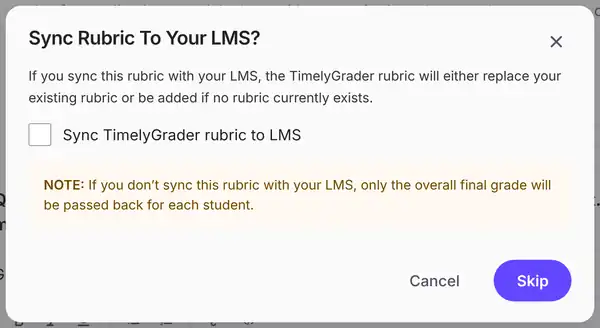
Quizzes ask the same question in the **Sync Rubric To Your LMS?** dialog, when you save a quiz at the end of the import and again when you publish it. With **Sync TimelyGrader rubric to LMS** ticked, the button reads **Sync** (or **Confirm & Sync** when publishing); unticked, it reads **Skip**.
See [Importing a Quiz](https://help.timelygrader.ai/canvas-support-articles/quizzes/import-quiz.md).
## What happens if you don’t sync
| | Rubric synced | Rubric not synced |
| ----------------------- | ---------------------------------------------- | -------------------------------- |
| Grade sent to Canvas | Each criterion’s grade, plus the overall grade | The overall grade only |
| Feedback sent to Canvas | Per-criterion feedback, next to each criterion | All feedback in the Comments box |
{% hint style="warning" %}
Syncing replaces the rubric on the Canvas assignment. If you changed the rubric in Canvas after importing, those changes are overwritten.
{% endhint %}
{% hint style="success" %} **Hugo’s tip:** Sync before you push grades. Criterion grades can only land in Canvas if the Canvas assignment has the same rubric.
{% endhint %}
## FAQ
I changed the rubric in TimelyGrader after syncing. Does Canvas update automatically?
No. Canvas only gets the rubric when you sync. Save or publish again and tick Sync TimelyGrader rubric to LMS so Canvas matches.
Why did Canvas only get an overall grade?
The rubric wasn’t synced to the Canvas assignment. Without it, only the overall grade is passed back and the feedback goes in the Comments box.
Are auto-graded quiz questions sent to Canvas?
No. Canvas already scored them. TimelyGrader only sends the grades for the questions it graded.
Can TAs sync a rubric?
No. TAs can’t edit assignment settings, including the rubric.
## Related articles
* [Understanding the Role of Rubrics on TimelyGrader](https://help.timelygrader.ai/canvas-support-articles/rubrics-page-managing-and-creating-rubrics-canvas/1.-understanding-the-role-of-rubrics-on-timelygrader.md)
* [Pushing Grades & Feedback Back to Canvas](https://help.timelygrader.ai/canvas-support-articles/assignments/push-grades-to-canvas.md)
* [Importing or Creating an Assignment](https://help.timelygrader.ai/canvas-support-articles/assignments/importing-or-creating-an-assignment.md)

 **Hugo’s tip:** Sync before you push grades. Criterion grades can only land in Canvas if the Canvas assignment has the same rubric.
{% endhint %}
## FAQ