> For the complete documentation index, see [llms.txt](https://help.timelygrader.ai/llms.txt). Markdown versions of documentation pages are available by appending `.md` to page URLs; this page is available as [Markdown](https://help.timelygrader.ai/d2l-support-articles/quizzes-d2l/additional-quiz-attempts.md).
# Uploading Additional Quiz Attempts
Upload attempts submitted since your last upload, and reset a quiz’s submissions when the wrong ones came across.
Attempts submitted after your first upload, including retakes, come in with **Upload Additional Submissions**. The report is already set up in Brightspace, so you only export the CSV again and upload it. Attempts that are already in TimelyGrader are skipped, and any grading you’ve done is left untouched.
## Uploading additional attempts
{% stepper %}
{% step %}
### Export the CSV again
In Brightspace, go to **Quizzes**, open the quiz’s dropdown and select **View Reports**, then click **TG Attempt Details**. Set **From** and **To** dates if you only want a date range, or leave them blank to export every attempt. Click **Generate CSV**, then download the file from the bell (**Updates**) when **Export finished** appears.
{% endstep %}
{% step %}
### Click Upload Additional Submissions
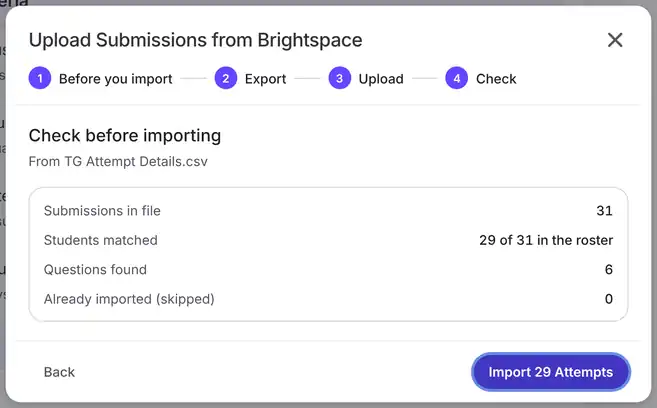
Open the quiz in TimelyGrader. In the right sidebar, under **Final Submission Grading & Feedback**, click **Upload Additional Submissions**. The dialog has three steps: **Export**, **Upload** and **Check**. The first repeats the export instructions; click **I’ve downloaded the CSV**.
{% endstep %}
{% step %}
### Upload the file
Click **Choose the CSV file**, select the file, and click **Upload**.
{% endstep %}
{% step %}
### Check, then import
The check shows how many new attempts matched a student, whether the questions are the same as before, and how many rows were **Already imported (skipped)**. Click **Import \[number] Attempts**.
{% hint style="info" %}
Rows already imported are skipped, so you can export every attempt each time without creating duplicates. A retake is a new submission, so it comes in as a new attempt to grade.
{% endhint %}
{% endstep %}
{% step %}
### Wait while they’re prepared
The sidebar shows **Preparing submissions…** until the new attempts join the queue, then updates the last upload. **Start Reviewing** opens them.
{% endstep %}
{% endstepper %}
## Resetting submissions
Use **Reset Submissions** when the wrong submissions came across, before uploading again.
{% stepper %}
{% step %}
### Click Reset Submissions
In the right sidebar, click **Reset Submissions**.
{% endstep %}
{% step %}
### Confirm
The dialog asks **Reset every submission?** Grades, feedback and inline comments for this quiz are cleared. The submitted attempts stay. Click **Reset submissions**.
{% hint style="danger" %}
A reset can’t be undone, and it clears the grading for every attempt in the quiz.
{% endhint %}
{% endstep %}
{% endstepper %}
## FAQ
Will uploading again overwrite grades I’ve already given?
No. Attempts already imported are skipped, and their grades are untouched.
Do I need to set up the report again?
No. You set it up once per quiz. Additional uploads start from Export.
Some rows in the new file couldn’t be matched.
They’re skipped. Fix them in Brightspace and upload again; nothing already imported changes.
## Related articles
* [Uploading Quiz Attempts](/d2l-support-articles/quizzes-d2l/importing-quiz-attempts.md)
* [Grading a Quiz Attempt](/d2l-support-articles/quizzes-d2l/grading-a-quiz-attempt.md)
* [Releasing Quiz Grades and Feedback](/d2l-support-articles/quizzes-d2l/releasing-quiz-grades.md)