> For the complete documentation index, see [llms.txt](https://help.timelygrader.ai/llms.txt). Markdown versions of documentation pages are available by appending `.md` to page URLs; this page is available as [Markdown](https://help.timelygrader.ai/self-serve-support-articles/10.-how-to-reset-grades-and-feedback.md).
# 10. How to Reset Grades and Feedback
Start over on an assignment by deleting its submissions, grades and feedback.
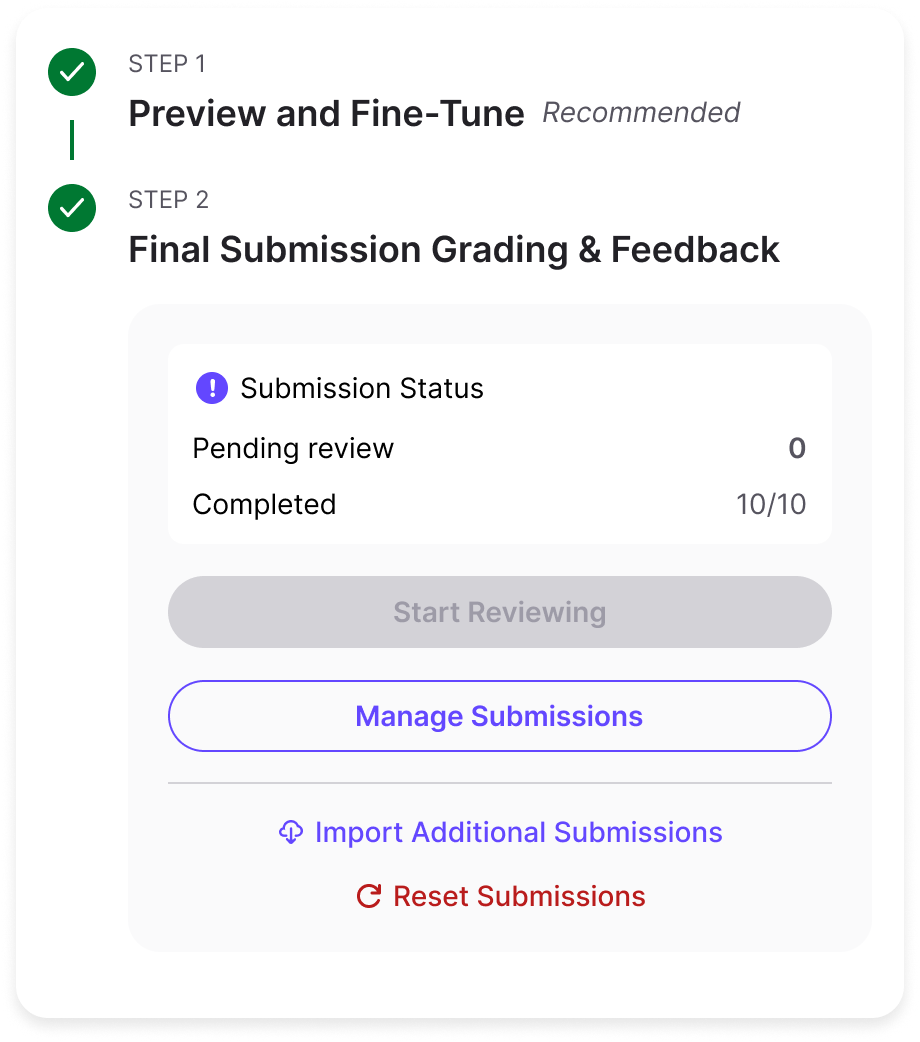
Resetting grades and feedback lets you start over on an assignment. It deletes all student submissions and erases any existing grades and feedback.
## What happens when you reset
* Uploaded student submissions are removed.
* Grades and feedback are permanently erased.
{% hint style="warning" %}
A reset can't be undone. Make sure you have the correct assignment before you continue.
{% endhint %}
## When to use the reset option
* You uploaded the wrong student submissions.
* You want to change the assignment details and regrade.
{% hint style="info" %}
Assignment settings lock once submissions are uploaded, so every student is graded the same way. To change the setup, either copy the assignment or reset grades and feedback first.
{% endhint %}
## Steps
{% stepper %}
{% step %}
### Open the assignment
Open the assignment you want to reset.
{% endstep %}
{% step %}
### Click Reset Submissions
Click **Reset Submissions**.
You can also open the **Manage Submission** page and click **Reset Submission**.
{% endstep %}
{% step %}
### Confirm the reset
Confirm that you want to delete all submissions, grades and feedback.
Once you click **Continue**, the submissions and their grades and feedback are permanently deleted. You can then edit the assignment setup and/or upload new submissions.
{% endstep %}
{% endstepper %}
## Related articles
* [Uploading Submissions for Grading and Feedback](https://help.timelygrader.ai/self-serve-support-articles/7.-uploading-submissions-for-grading-and-feedback.md)
* [Creating an Assignment](https://help.timelygrader.ai/self-serve-support-articles/5.-creating-an-assignment.md)
* [How to Grade Submissions with TimelyGrader](https://help.timelygrader.ai/self-serve-support-articles/8.-how-to-grade-submissions-with-timelygrader.md)